
LOCAL VOICE DICTATION · OPTIONAL AI POLISH · WINDOWS
Speak. It types.
Your voice stays local.
Hold a key, talk, release — your words appear in whatever app you're using. Whisper AI runs on your own machine, with game chat shortcuts when you want speed and one-click reformatting when you want cleaner emails.
▲ THE HUD — LIVE WAVEFORM, THEN PROOF OF WHAT IT HEARD
Types anywhere
Email, chat, docs, code, games — if your cursor blinks there, REMsound types there. Hold Right Ctrl, go hands-free with F9, or click the floating orb.
One-click polish
After dictation, the orb can split into R for reformat and E for Enter. Rewrite the last text in place, then send it without touching the keyboard.
Orb quick menu
Right-click the floating orb and six little satellite orbs bloom around it — each one wired to a voice command you've assigned. One click instead of talking, for whatever you reach for most.
Game mode
In games, DMs, comments, and search boxes, REMsound can stay lowercase, one-line, and abbreviation-friendly: "be right back" becomes brb.
Teach it a fix
Highlight a word Whisper keeps mishearing and say "change this" — type the correction in the popup and it's learned permanently, applied on every future dictation.
Read-back before send
Niche and off by default: flip it on and hear your dictation spoken back before it's typed. The orb itself splits into Cancel/Send the moment it starts talking — full mouse control, no keyboard needed.
Prompt engineer
Off by default. When on, reformatting asks Polish or Prompt — Prompt rewrites your rough dictation into a well-engineered AI prompt via your cloud provider, sized to match how complex the ask actually is.
Multi-language
Speak French, get French. Speak anything, get English — built into Whisper, still fully local. Want a different output language entirely? That routes through your reformat engine.
Voice commands
"select all" presses Ctrl+A. "search for anything" Googles it. Highlight text and say "delete that" to remove it. Build your own commands to open apps, press keys, run anything.
Private by physics
Whisper runs on your CPU/GPU. Audio is transcribed in RAM and never uploaded. Optional cloud reformat sends text only, only when you choose it.
Update aware
The tray can check GitHub Releases for a newer public build and open the latest download link without hunting through pages.
THE GUIDE
From zip to talking in about a minute
- Download & unzip Grab the zip with the button above, right-click → Extract All… — anywhere you like.
- Double-click INSTALL.bat Copies REMsound to your user folder and puts icons on your Desktop and Start Menu. Prefer portable? Skip this — REMsound.exe runs straight from the folder.
- Launch REMsound A teal microphone appears in your system tray and the HUD flashes “ONLINE — hold [right ctrl] to dictate”. First dictation downloads the speech model (~75 MB) — one time, then it's fully offline.
Hold Right Ctrl, speak, release. That's the whole skill. Tap F9 instead for hands-free mode — talk as long as you like, tap again to finish.
Cyan, waveform dancing to your voice. Flat bars = check your mic.
Amber sweep — speech becoming text. Usually under a second.
Shows exactly what it typed. Your proof-of-delivery, every time.
Changed your mind mid-sentence? Click the ✕ on the pill — cancelled, nothing typed.
After each dictation, the floating orb can split into two fast actions: R reformats the last dictation in place, and E presses Enter in the same target app. The separate ⟲ REFORMAT chip can still appear beside the HUD too.
Right-click the orb any other time for its quick menu: six little satellite orbs bloom around it in a ring, each one wired to a voice command you've picked in the Control Deck. One click runs it — no talking, no hotkey, just point and click.
Reformat can use the built-in tidier, local Ollama, or optional cloud providers like Gemini, Grok, OpenAI, and Claude. You choose when polish happens, so chat stays casual and emails get professional. Cloud engines receive only the text being reformatted, never your microphone audio.
Replacement is tunable: fast field replace uses Ctrl+A and paste for quick email drafts; precise previous text selects just the last injected span for safer mixed-content fields.
Game mode keeps casual places casual. Matching game executables and browser titles like Facebook, Messenger, YouTube, Google Search, X, and Twitter can use lowercase one-line output with separate gamer shortcuts like brb, omw, np, inv, wtb, and lfg.
REMsound can also mute your computer's sound while you dictate so music never bleeds into the mic, and single takes can run up to 10 minutes.
Dictate in your language, type in another. Pick a spoken language (or let it auto-detect) and a typed language in the Control Deck. Same language transcribes natively; any language → English is Whisper's own built-in translation, still 100% local; any other target language translates through Ollama or a cloud provider. Non-English input quietly upgrades to the multilingual model the first time it's needed.
Whisper mishears a word? Highlight it, say “change this”, type the fix in the popup that appears above the HUD, press Enter. It's learned for good — applied on every dictation from then on, and kept separate from your own replacements so you can always tell what REMsound taught itself.
Read-back before send is niche on purpose — off by default. Click the small speaker button beside the HUD pill to flip it on for a dictation that matters: REMsound speaks the text back to you first. The instant it starts talking, the orb splits into a red Cancel half and a violet sEnd half — click either, no keyboard required — or press Enter to send, or let it send itself after a short timeout.
Prompt engineer is also off by default (Control Deck → Reformat). Turn it on and every reformat trigger asks first: Polish the text, or turn it into a well-engineered Prompt for an AI assistant? Prompt mode needs a cloud reformat provider connected — without one it just stays out of the way and reformat works exactly as before.
Then try saying (on their own): “select all” · “press enter” · “delete that” (after highlighting text) · “open notepad” · “search for northern lights tonight” — and inside a sentence: “new line”, “new paragraph”, “smiley face”.
Your speech stays on your machine. REMsound uses the open-source Whisper speech model via faster-whisper, running on your own processor. Your voice is captured, transcribed in memory, typed, and gone.
- Core dictation is local: the first run downloads the speech model from Hugging Face. After that, normal dictation works offline.
- Cloud polish is opt-in: if you select Gemini, Grok, OpenAI, or Claude, only the text you reformat is sent to that provider.
- Local polish remains available: use built-in rules or Ollama if you want reformatting without sending text out.
- Update checks are lightweight: REMsound can ask GitHub Releases which version is latest, and you can turn that off.
- No accounts, no telemetry, no analytics — there is literally no server.
- Your dictation history is a plain text file on your disk, for you alone. One toggle turns it off.
AI POLISH
Dictate rough. Send clean.
REMsound separates speech recognition from writing polish. Your voice is transcribed locally first; then, only when you ask, the text can be cleaned up into a professional email, message, or paragraph.
Local by default
The default path tries local Ollama if you have it, then falls back to built-in formatting rules for punctuation, paragraphs, greetings, and sign-offs.
Cloud when chosen
Gemini Flash Lite, Grok, OpenAI, and Claude are available from the Control Deck. Keys stay in your local config; only the text you reformat is sent.
Fast replacement
Choose fast field replace for clean email drafts, or precise previous-text replace when the field already contains other content you want to preserve.
CONTROL DECK
Every single behaviour is yours to rewire
REMsound ships with its own settings app — no config files needed. Ten focused categories in a sidebar — Hotkeys & Model, Output & Cleanup, Reformat & AI, Read-back, Game Mode, Words & Corrections, Voice Commands, Floating Orb, HUD & Sounds, System — so you jump straight to what you need instead of scrolling one long page. Change anything, hit Save & Apply, and the running app reloads instantly.
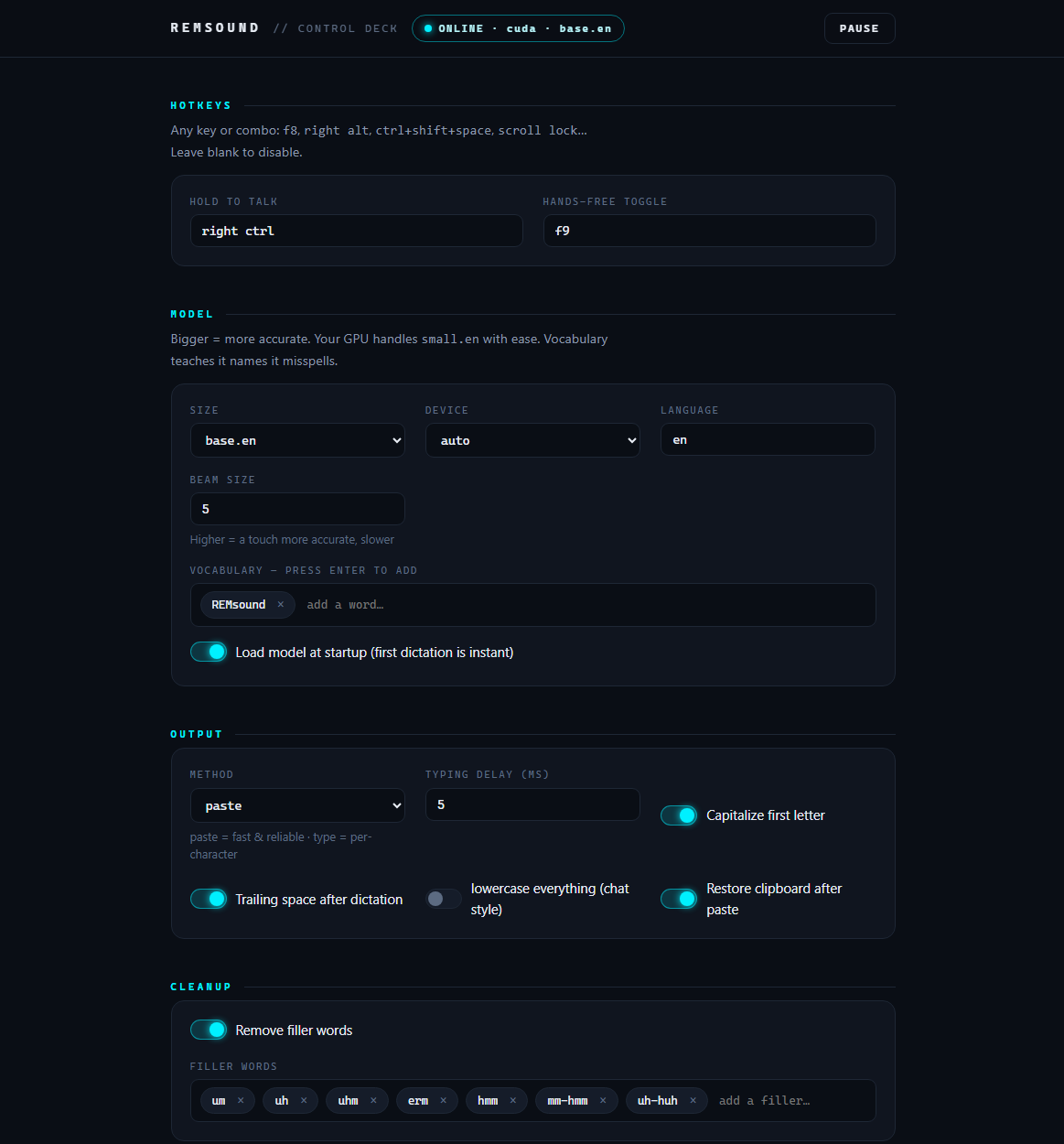
- Hotkeys — any key or combo for push-to-talk and hands-free.
- Your own voice commands — open apps and URLs, press key combos, run anything, with wildcard phrases.
- Text shortcuts — say “my address”, get your address.
- Per-app styles — lowercase in Discord, code-friendly in VS Code, automatically.
- Game mode — relaxed one-line output for games, DMs, comments, and search boxes, with separate abbreviation replacements.
- Floating orb — click to start/stop dictation, drag it anywhere, tune its size, opacity, color, and split R/E actions.
- Orb quick menu — right-click the orb, assign six voice commands to six satellite orbs, run any one in a single click.
- One-click reformat — built-in rules, Ollama, Gemini Flash Lite, Grok, OpenAI, or Claude, with local API-key storage.
- Prompt engineer — an optional Polish-or-Prompt choice on every reformat, turning rough dictation into a well-engineered AI prompt.
- Replace mode — choose fast field replacement or precise previous-text replacement for polished drafts.
- Updates — startup checks, manual tray checks, a check-for-updates button right in the Control Deck, and the stable latest-download URL are all configurable.
- Auto-mute — silence your speakers while dictating, restored the moment you stop.
- Audio cues — soft sci-fi synth cues or classic beeps, with volume controls.
- The AI itself — five model sizes, from instant to studio-grade; teach it names it misspells.
- Languages — pick spoken and typed language independently, or auto-detect what you say.
- Learned words — teach corrections with "change this"; reviewed separately from your own replacements.
- Read-back before send — voice, speed, and auto-send timeout, all tunable; off by default.
- Every click target is resizable — the orb, the offer chip, and the read-back toggle all scale up if you want a bigger target.
- Neon theming — recolor the HUD to any glow you like.
- History — searchable log of everything you've dictated, kept on your disk.
Give your keyboard a rest.
One zip. No installer wizards, no accounts. Local dictation first; game mode and cloud polish only when you enable them.
⬇ DOWNLOAD REMSOUND FOR WINDOWS